Showing posts with label Tech Tips. Show all posts

Thursday, November 10, 2011

10 Tricks to Website Link Building Tips for Bloggers


Dear Visitors Today i Talking about SEO, Link Building, The All Users Need to know that how become top in Google Search Results, in this post we discuss about Link Building, As the number of online blogs continue to increase every day, it becomes more difficult to make your blog stand out from the crowd. Many bloggers want to build a strong reputation in their industry, but they just don’t know where to start with marketing and promotion.
One of the most productive things that any blogger can do is work to build links from other websites and blogs.

Inbound links are important for a few different reasons:

1. Search Traffic

The quality and quantity of inbound links are two of the most significant factors that are used to determine search engine rankings. Any effective SEO campaign will include link building efforts of some sort.

2. Click-Through Traffic

If you have several links pointing to your website from other websites, it’s probable that some visitors will click through and visit your site as a result of the links. Click-through traffic is usually of secondary importance in link building campaigns, just behind search traffic.

3. Reputation and Exposure

Building links from other websites in your industry or niche will help make more people aware of your blog. Over a period of time, this can result in a better reputation and increased awareness.

4. Diversity of Traffic

Link building is key to achieving diversity in your traffic sources because it impacts search traffic, click-through traffic, as well as direct traffic (such as visitors typing in your URL) and subscribers, which can be improved as a result of better exposure and awareness.

Link Building Techniques for Bloggers

Now that we have taken a look at the benefits of link building we can go over some of the specific techniques that bloggers can use to gain links from other websites. Each blogger should consider his or her own situation and the goals that they have for their blog and then use that knowledge to develop a link building plan. Try to focus on just a few of the link building techniques rather than trying to do everything.

1. High-Quality Content

The best thing any blogger can do to attract links is to focus on posting the highest quality content. Many of the techniques that we will discuss here involve other bloggers and website owners choosing to link to you. By having high quality content, you will increase the chances that you will earn a link. There are millions of blogs out there that have average content. If you can produce content that can’t be found on every other blog, people will be much more likely to link to you. Creating high-quality content is really something that every blogger should focus on, regardless of the strategy that is being taken.

2. Guest Posting

Writing posts for other blogs is a great way to build high-quality links. Almost all blogs that accept guest posts will include an author bio with a link to the author’s website or blog – so you can get a link for every article that you write. Writing guest posts does take time, so few bloggers actively use it as a link building approach. However, I can tell you from experience that it works very well.
Getting links from high-quality sites is not usually very easy. However, most bloggers are very open to publishing posts from others because it helps to take the burden off of them to produce all of the content, and in many cases, this includes quality blogs with established audiences.
The benefits of guest posting include:
  • You can get links from high quality blogs.
  • As you do more guest posts in your niche, readers get used to seeing your name and you start to develop a reputation as an expert.
  • You get to network with well-connected and influential blog owners in your niche.
If you want to get started with guest posting, visit a number of other blogs in your niche or industry. Take a look to see if they publish posts from different writers, as this can be a good sign that they would be open to guest posts. Some blogs even include a “write for us” page that provides the details for those who are interested. If you don’t see any information on the site, fill out a contact form or send an email to the blog owner to briefly introduce yourself and to ask if they accept guest posts. This is a technique that I used extensively when I launched my first blog, and it’s much more effective than most people realize.

3. Social Media

Social Media Marketing has been widely associated with link building for the last several years. Social media sites like Digg, Reddit, and Mixx have the potential to send a lot of visitors to a submission that becomes popular, and the end result can be a number of inbound links from various sites and blogs.
With social media marketing, there are basically two different ways that you can build links. First, you can build links directly from social media websites to your blog. Every time you (or someone else) submits one of your posts to a social media site, a link is created from that site to yours. Because there are so many different social media sites out there, this has the potential to add up to a lot of links. It’s important to note that some social media sites will use “nofollow” tags on submissions, which will hurt your ability to build effective links this way. Also, there are a growing number of social media sites that focus on specific niches. If you submit your content/links to a site that is not relevant, then it will look like spam (and probably will be deleted by an administrator).
The second way to build links with social media marketing is to use the social media sites as a gateway to bloggers and website owners. The most popular items on social media sites will usually attract a number of links from bloggers and site owners who have found the content through social media. So, the links are actually coming from other sites, but they are a result of having a popular item on a social media site.
Generally the second type of link is more valuable because the potential for quantity of links is much higher and also because of the fact that many social media sites use “nofollow” tags. If you are attempting to build an authority blog and want to use social media, don’t concentrate on getting your site submitted to as many social media sites as possible. Instead, focus on helping it to become as successful as possible on your targeted social media sites and see what links you can build as a result.
There are a lot of products and services out there that will submit your links automatically to hundreds of social media sites. For authority blogs, this is generally not a good idea as it can lead to you being viewed as a spammer for irrelevant and automated submissions. These services are sometimes used with success for smaller blogs that are monetized through AdSense or affiliate programs, as opposed to taking an authority approach.

4. Link Exchanges

Reciprocal links (two sites linking to each other) can be effective when used in moderation. Several years ago when website owners began to learn of the importance of link building for search ranking, there was an explosion in link exchanges, and in some cases, automated software to do so. As a result, the search engines adjusted their algorithms and reciprocal linking in mass is no longer effective. However, when used in moderation, it can still be very helpful.
Most blogs include a blogroll or a friends list of some sort. It’s a common practice for bloggers to exchange blogroll or friends’ links with a few bloggers in their niche. If you limit this to around 10 or so, then this type of reciprocal link exchange can be effective and will probably not create any red flags, red flags that would suggest to the search engines that you are trying to manipulate the rankings.
One mistake that many new bloggers make with link exchanges is that they contact the most popular blogs in their niche to request an exchange. These popular blogs receive tons of requests for links and there is really no incentive for them to exchange links with a new blog (unless they are a friend of the blogger). As a result, your chances of getting a popular blog to accept a link exchange as a new blogger are slim to none. It’s much more effective to focus your efforts on securing link exchanges from bloggers who are at a similar stage.

5. Article Marketing

Article marketing through directories like Ezine Articles and Go Articles has been used for years by internet marketers, but is generally not used by bloggers. As you submit articles, you will be able to get links from the directories you submitted to plus links from any sites that re-publish your articles. One of the main benefits is that you can control the anchor text because you will be able to set up your own author bio which gives you the ability to target keywords and phrases of your choosing. On the down side, most of the sites that re-publish your articles will not be very high quality links, although some of the directories themselves have a decent PageRank.
Over the past year, I have experimented with article marketing through a service called Unique Article Wizard and had some very positive results for clients. Article Marketing has the potential to bring in a lot of links to any website or blog, but it does take considerable time to submit your articles to so many directories, and with duplicate content issues the results may not always justify the time. As a result, there are a number of programs and services that allow you to submit your articles to a large number of article directories, and Unique Article Wizard is one of them. In the case of UAW, the submissions only go to sites that have agreed to receive their submissions. These sites utilize techniques that help to avoid duplicate content issues. When researching article submission services, I have read a lot of positive things about UAW. So far, I have been very pleased with it, and my clients have loved the results. UAW is not cheap ($67 per month), but if you consider the time that it saves, it is a bargain. There are a number of other similar services out there for a wide range of prices, however, I have no personal experience with them to make any further recommendations.

6. Freebies

Many bloggers have been able to leverage freebies from their blog to build links. For example: you could give away free blog themes, e-books, Firefox extensions, Photoshop brushes, or whatever is relevant to your audience. People love getting quality things for free, so freebies have the potential to attract a high number of links from other sites.

7. Blog Carnivals

A blog carnival is essentially a group of links on a related subject. The list of links is published at a blog that is the host of the carnival, and other bloggers can submit their posts to be included. In essence, you would publish the post on your own blog and then submit a request to the carnival host to include a link to your post. All you have to do is find carnivals with related topics and then submit posts that you have recently published. It’s an easy way to build some links to your blog, especially for new bloggers.
To see the biggest collection of carnivals, visit BlogCarnival.com. Each carnival will have a date, so if it is still in the future, you can submit your link for consideration.

8. User-Generated Content Sites

Sites like HubPages and Squidoo allow users to publish content, which can include links to other sites. Many site owners set up pages on these sites about topics that are relevant to their own sites and include a link to themselves. It’s similar to article marketing, but only on one site at a time. Each site has it’s own rules and regulations, so be sure that whatever you are doing is within the guidelines. HubPages also gives a score to users and to each hub (a hub is a user-created page). If the user’s score drops below 75, “nofollow” tags will be placed on outgoing links. Some people also set up free blogs on WordPress.com and Blogspot.com to link back to their own website or blog.

9. Blog Comments

Most blogging engines use “nofollow” tags on any links within the comments by default, but some bloggers have reversed this so that links are not “nofollowed”. These bloggers generally do this to attract more comments by giving added incentive to commenters, so if you want some easy links, you can comment on these blogs. You can find lists of “dofollow” blogs by going to sites like DoFollowBlogs.com and FollowList.com. Google recommends that links in blog comments include “nofollow” tags, and they can tell when links are coming from comments. As a result, these links are generally not worth a whole lot in terms of SEO even when they are dofollow because Google has reduced the weight that is given to them.

10. Gallery Sites

If your blog uses a very high-quality custom design (not a theme used by other blogs), you may be able to rack up a lot of links by submitting your site to design and CSS galleries. There are literally hundreds of sites out there that showcase great design. You can submit your site for inclusion manually, or if you would like to save some time, you can spend about $15 – $20 to have it done for you. Services like The CSS Gallery List will submit your site to about 100 galleries for a one-time fee. However, this does not guarantee inclusion in any gallery, just that your site will be quickly submitted (saving you time).

What’s Your Approach to Link Building?

I’m interested to hear what readers have to say about link building and to learn more about what you have done to build links to your own blogs.

Thursday, October 13, 2011

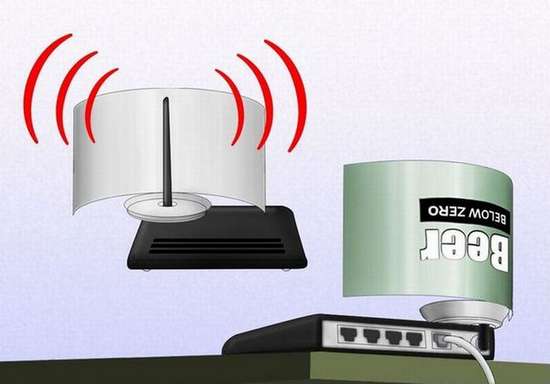
How to Increase You Wi-Fi Signal with an Empty Can of Coke

Dear Visitors Today in this Post i tell you very interesting Tricks how to increase your Wi-Fi Signal with an Empty Can of Coke, Your wifi signal is low and you can’t afford to buy a new router? Don’t worry! Check out below how to improve your router’s wifi signal. All you need is an empty soda like coca cola, Pepsi, 7up, Sprite, or beer can.


Sunday, September 18, 2011

Facebook Profile into a Virtual Museum Intel Apps

Intel’s Museum of Me is a brilliant online app that turns your Facebook profile into a virtual museum with the click of a button.
Simply authorize the Museum of Me app to access your Facebook profile and it will pull your photographs, pictures of friends you frequently interact with, your location and other data that you may have shared on Facebook and turns everything into an impressive animated movie.
This is much like taking a walking tour of a virtual museum where all the rooms and galleries display exhibits that are you own.
There’s no option to export your museum as a video though you may use a screencasting tool like Camtasia, Fraps, screen recorder to record the output as I have done for the following video.
If you have a Facebook profile, this is something you should not miss.


Friday, September 16, 2011

PK.MSN.COM Launched


msn pakistan PK.MSN.COM Launched
MSN has launched localized version of its online portal, which was functional for quite some time, but they have rolled out the enhanced format just recently. Though in it’s initial stages, but yes, it’s live and all visitors from Pakistan are being redirected to this localized page.
MSNMicrosoft’s portal, is considered as World’s earliest online content provider of news, entertainment, and common interest topics and now they want to give you (slightly) localized experience – here’s the url: http://pk.msn.com
You won’t find too much local content for now, but there are a few news about Pakistan  - oh and have you noticed, Hina Rabani Khar featured there as well?
While on the other hand, photo gallery, entertainment news, politics, business and technology are all about US and India. Have a look at following  news featuring on the top. I wonder what it is doing here when MSN has another dedicated portal for India, and pretty developed one indeed.
msn pk1 PK.MSN.COM Launched

So for now, it’s more about local weather and few news about Pakistan only (in most visited section) – may be we need to wait till things get to going and we start seeing the real deal!
By the way, Twitter, Facebook and other social buttons are linked to MSN Arabia – they might want to localize them too.
It merits mentioning here that MSN Pakistan is being managed by OT Ventures – the Omani company which manages Mobilink and LinkDotNet services in Pakistan.

Thursday, September 15, 2011

Microsoft Open Door Coming to Pakistan at ITCN Asia

Microsoft has announced it’s mega IT event of the year to bring together information technology professionals from around the country and region at ITCN Asia next week.

Conventionally named as “Microsoft Open Door” is an event where Microsoft offers IT professionals to learn about the latest IT administration and management, software development and see how to solve actual business tasks.

In addition to discussion on power of Cloud and Business Productivity, agenda for this year’s open door include:


  • SQL Denali What’s new
  • Virtual Desktop Infrastructure
  • Windows 8 Preview
  • SharePoint and Digital marketing
  • Application Development using Windows Phone 7
  • and more

The event is your chance to increase your knowledge, advance your skills and network with your local IT community as well as international Microsoft and industry experts.

Visit This link for more about the agenda, speakers and Registration.

Thanks for iDynamic Solutions

Pakistani Mobile App Wins Global Recognition Animal 101


Pakistani IT industry has marked another record as a Pakistani firm TenPearls has bagged 2nd position and received a $50,000 cash prize at ‘Nokia & AT&T Innovators 2011 Contest’ held recently.
This is the second award TenPearls has received for its mobile app named “Animal 101” within a year in which it competed against more than 800 entrants for top spots.
The first award was the 1st prize that TenPearls received for the uTrack mobile app earlier in 2011 for the same platform in Pakistan.
Pakistani Mobile App Wins Global Recognition  Scr000003 thumb Pakistani Mobile App Wins Global Recognition  Pakistani Mobile App Wins Global Recognition
Animal 101 is an interactive application for children and parents alike. It is a learning based application about animals that aims to teach children of 3 to 8 years to learn about animals by engaging them in fun and interactive games.
It was selected in the Trivia and Education category of Nokia and AT&T’s “Calling All Innovators 2011mobile app and games contest.
The Calling All Innovators 2011 global competition encouraged app and game developers from around the world to submit mobile apps in 17 categories for a chance to share in a total of $10 million in cash and prizes.
TenPearls has plans to launch a number of new feature rich mobile apps in Pakistan for Nokia with an aim to facilitate maximum number of people to find real value and convenience in their mobile experience in line with Nokia’s aim to enable personalized mobile communications.
Imran Aftab, President of TenPearls said that his company is looking forward to building more applications on Nokia’s smart devices and leveraging our relationship for greater business successes.
The Calling All Innovators 2011 Contest used a blend of consumer and expert judging to determine the category winners. The judging was based on total app downloads by consumers and sales totals on Nokia’s Ovi Store.
It is great to see that the application also won recognition on an international level, said Rabia Azfar, Business Development Manager EDX, NOKIA Near East.
We see TenPearls as our long term partners who have so much potential to contribute to Pakistan’s software industry, she added.
The top 10 apps in each category (five paid apps and five free apps) advanced as category finalists and were then judged by an expert panel of judges from AT&T and Nokia.
Nokia chose this blend of consumer and expert judging to help ensure that the best apps were not only the most popular apps but also provide the best user experience.

iDynamic Solutions

Monday, September 12, 2011

How to Create a Custom Facebook Page in 5 Minutes


custom facebook page
My previous guide on creating custom Facebook Pages is no longer relevant since it made use of Static FBML (Facebook Markup Language) and Facebook recently dropped support for FBML tags in favor of IFRAME based tabs.
This is actually good news for businesses and individuals who maintain Facebook Pages because you can now customize the design of your Pages without writing any code. You can create custom apps (or ‘tabs’) for your Facebook Page in any WYSIWYG editor and thus, anything that can be embedded in a HTML page can be easily added to your Facebook Pages.

Building Custom Tabs (Apps) for Facebook Pages

Before we get into the actual process of creating custom tabs for Facebook Pages, we need to decide a place where we’ll host the HTML, CSS and other associated files. If you already have a web host, you can use that to host your Facebook Pages but an even better, and simpler, option is Google Sites.
[*] The Digital Inspiration page on Facebook also uses Google Sites.
There are several reasons why you may want to use Google Sites. Google Sites are easy to maintain, offer WYSIWGY editing tools and can be integrated with Google Analytics so you more easily track visitors to your Facebook pages.
The other big reason is that Google Sites support both secure (https) and regular (http) connections. This is extremely essential because some users may have turned on “secure browsing” in their Facebook security settings. If you service your Page content from a regular (http) connection, all they’ll see is a “turn off secure browsing” warning messages.
You can easily avoid this issue with the help of Google Sites.
secure facebook https

How to Create a Facebook App for your Page

Enough of theory, let’s now get our hands dirty and build a custom tab app for our Facebook Page.
Step 1: Open Google Sites and create a new site. Choose “Blank Slate” for the theme and set the width as 500px (the Facebook Pages canvas can be 520px wide). [#]
Step 2: Create a new page in Google Sites and add some content to this page using either the built-in WYSIWYG editor or switch to the HTML view for any custom code. You may insert images, maps, videos, and everything else just like a regular HTML page. [#]
Step 3: Switch to Facebook and search for the “Developer” app. Add this to your Facebook Profile and then click on the button that says “Create a new App”. Give your app a name and also add an icon since it will show up in your Facebook page. [#]
Step 4: Under Facebook –> Canvas Settings, set the URLs for Canvas and Tab the same as your Google Site’s URL. The regular Canvas /Tab URL should point to the http version of the Google Sites while the Secure Canvas /Tab URL should use the https version. [#]
Step 5: We are almost done. On the “Canvas Settings” page itself, click “View App Profile Page” followed by “Add to My Page” to add that app to any of your Facebook Pages as a new “tab.” If you wish to create more tabs for your custom Facebook Page, you just have to create new apps using the same steps.

Video Tutorial: Creating Custom Facebook Pages

You need Help? Watch the following step-by-step video tutorial to learn how to create custom tabs for your Facebook pages using Google Sites. i copy this all information from labnol.org. Thanks for Digital Inspiration.

Sunday, September 11, 2011

Wi-Tribe Partners with Microsoft to Promote IE9


Aiming to take internet users’ online experience to the next level, wi-tribe has partnered with Microsoft to promote its faster and lighter browser, Internet Explorer 9 (IE9), said a statement issued wi-tribe today.
This is another industry-first by wi-tribe, adding more value to their customers’ online experience.
wi tribe Microsoft partnership thumb wi tribe Alliances With Microsoft to Enhance Online Experiences
Through this partnership, wi-tribe will ensure easy availability of one of the most secure, widely deployed and easy-to-use web browsers for its customers, which is sure to enhance their online experience by enabling the latest, media-rich websites.
IE9 is a highly advanced browser that supports HTML5, and promises to deliver a seamless and secure internet browsing experience, empowered by a robust set of built-in security and privacy features.
In addition to this partnership, wi-tribe is also proud to be recognized as a Microsoft Registered Partner status. For both wi-tribe and Microsoft, these are some of many exciting steps to be taken during this strategic alliance, aimed at bringing a greater range of world-class offerings to the market by exploiting the long-term synergy between both companies.
Speaking about Microsoft & wi-tribe’s new venture, CEO of wi-tribe Pakistan, Mustafa Peracha, says,
“As a registered partner, wi-tribe is very excited about collaborating with Microsoft for the global launch of Internet Explorer 9, a cutting-edge browser promising a captivating and superior web browsing experience for customers and developers alike.
We are confident that this alliance will bring a host of value additions to our own community of users, enhancing their online experience to an entirely new and refreshing level. This is an exciting start of a long-term partnership.”

Saturday, August 20, 2011

Search Engine Optimization Techniques in 34 Steps

You completed a web site for your business about three months ago, but you are still not seeing very many people visiting your web site. You do a little research and find that your web site is buried about ten pages deep on all of the major search engines. It seems that you have created a very nice web site, but it is not optimized for search engines, so your page rank is very low.

Search engine optimization has become a very large field for many different consultants all over the internet. However the techniques needed to optimize your web site for search engines are not very hard to implement on your web site all by yourself. Here are a few of the most important things that you can do for search engine optimization:

1. Use keywords throughout your web site

Many people do a good job putting a good description and group of keywords in their meta tags, but they do not use these same keywords throughout the rest of their web site. You must continue to use your keywords throughout the content on the rest of your web site if you would like to get high search engine rankings.

2. Create a sitemap

Many search engines will try to index your site’s pages by following links to all of the different pages. However if a search engine is unable to follow a link, then a page might not get included in the search engine’s results. To make sure all of your pages get indexed, make sure that you have a text-based sitemap that includes all of the major pages of your web site.

3. Use Flash sparingly

Flash is a very neat technology and it has its place on the web. However you do not want to overuse Flash, because a search engine will not be able to read the text that is embedded in the Flash elements, which could hurt your ranking if you have keywords in that area.

4. Get inbound links

One of the best things that you can do for search engine optimization is to get inbound links to your web site. If you are able to get high quality web sites that relate to your business to link to your web site, then your search engine ranking is sure to climb.

5. Domain Name

Your domain name should be brandable (example: Google, Amazon, Yahoo!, etc.), easy to say, and even easier to remember. Don’t worry too much about stuffing keywords into your domain name. Keywords in domain names no longer have the punch they used to.

6. www or not www

The choice is yours, www.idynamicsolutions.com/ or idynamicsolutions.com/, pick one and stick with it. I recommend using the www.

7. Simple Design

Don’t reinvent the wheel. If your design is complex, chances are it will hinder your visitors’ ability to navigate and view the site plus it will slow down development. The simpler the better.

8. Don’t create directories further than three levels down from the root directory

The closer pages are to the home page in the directory structure the better. Keep things organized but don’t overorganize. If you have one file or sub-directory in a directory there should be a VERY valid reason.

9. File/Directory Names Using Keywords

Your filenames and directory names should contain keywords. If your page is about Idaho potatoes then the filename should be idaho-potatoes.

10. URLs

Static URLs are URLs that are not dynamically generated. A static URL looks like www.idynamicsolutions.com/file-name.html and dynamic URLs look like www.idynamicsolutions.com/tag/jquery/. You can make dynamic URLs spiderable by search engines but it’s a lot easier to get things indexed with static URLs.

11. Think Small

The smaller your Web pages are, the faster they load. A single page should be less than 15K (unless absolutely necessary) and the entire page including graphics should be less than 50K (unless absolutely necessary). Remember, not everyone is on a high-speed Internet connection; there are still people without a 56K modem.

12. Hyphens

Use hyphens ( – ) and not underscores ( _ ) to separate words in directory and file names. Most search engines parse a hyphen like a reader would parse a space. Using underscores makes what_would_you_do look like whatwouldyoudo to most search engines. You should definitely separate words in your URLs.

13. Navigation on Every Page

You should place consistent navigation on every page of your Web site. Your navigation should link to the major sections of your Web site. It would also make sense for every page on your Web site to link back to the home page.

14. Title

The title of the page should be used in the TITLE tag and at the top of every page. The title should be keyword rich (containing a max of 7 to 10 words) and descriptive.

15. Description META Tag

Some people say META tags are dead but some search engines will actually use them underneath a pages title on search engine result pages (SERPs). Use no more than 150 characters including spaces and punctuation. Your description should be a keyword rich, complete sentence.

16. Keyword META Tag

A listing of keywords that appear in the page. Use a space to separate keywords (not a comma). Arrange keywords how they would be searched for or as close to a complete sentence as possible. This tag is basically dead but by creating it when you create the page it allows you to come back eons later and realize what keywords you were specifically targetting. If the keyword doesn’t appear at least twice in the page then it shouldn’t go in the Keyword META Tag. Also, try to limit the number of total keywords to under twenty.

17. Robots META Tag

Some search engine crawlers abide by the Robots META Tag. This gives you some control over what appears in a search engine and what doesn’t. This isn’t an essential aspect of search engine optimization but it doesn’t hurt to add it in.

18. Heading Tags

Heading tags should be used wherever possible and should be structured appropriately (H1, H2, H3, H4, H5, H6). You shouldn’t start a page with an H2 tag. If H1 by default is too big then use CSS to style it effectively. Remember that most search engines like to see a heading tag then text or graphics; not H1 followed immediately by H2.

19. TITLE Attribute

Use the A HREF TITLE attribute (example: rel="nofollow"). The TITLE attribute improves usability/accessibility. Be sure to include keywords as you see fit but remember it should tell your visitors where they will go when they click the link.

20. ALT Tags

Every image should have an ALT tag. Use a keyword rich description of what the image is. If the image contains text use the text in the image. This is also a usability/accessibility tool.

21. More text than HTML

A page should have more text content than markup language.

22. Anchor Text

Anchor text is the text used to link to a page. Using keywords in anchor text is a very good idea and will improve a page’s performance in SERPs.

23. Use Text Links, Not Images

If you’re going to link to something use text. Text in images can’t be read by search engines. The only time this rule doesn’t apply is when you’re linking to something with a well known logo. Even then it’s still better to use a text link. If you must use an image as a link then make sure you give it a good ALT tag.

24. Gobs of Content

The more content, the better. Having pages upon pages of original, relevant content is the best form of search engine optimization.

25. Add New Content Often

If you can add a new page of content every day then your site will stay fresh and give search engine crawlers a reason to keep coming back day in and day out.

26. Keyword Density

This is a touchy topic among Web developers and search engine optimizers. Some say 5% is more than enough. Chris Short says your main keywords shouldn’t have a density of more than 30% and should be higher than the densities of other phrases and words.

27. Build It, Put It Online

Your site should be built and in "update mode" once it’s uploaded to your Web server. Don’t add a page at a time to your Web server when you’re first building your Web site. Build your Web site first then upload it. Add new content as needed.

28. Use a robots.txt File

Every good crawler looks for a robots.txt file in your root directory. I would highly recommend creating a valid robots.txt just to appease these search engines and at the very least eliminate 404 errors from building up in your log files.

29. Validation

Every page on your Web site should adhere to W3C standards as closely as possible. Some say page validation can help your ranking in SERPs (the jury is still out on that one). But, standards compliant Web pages do help with cross browser compatibility.

30. Link Popularity

Once your Web site has been well established, it’s time to build up your link popularity. The more relevant inbound links a Web site has, the better its rankings will be.
31. Analyze Traffic

Read your log files often. Make sure you’re not getting traffic you don’t want and getting traffic you do want. Keeping a pulse on your traffic allows you to better optimize your pages.

32. No tricks

If it doesn’t seem ethical, then it isn’t a good idea. If it doesn’t help your visitors, then don’t do it.

33. No frames

Don’t use frames, ever.

34. No broken links

Linking to pages that don’t exist is a very bad thing. Search engines and people alike hate that.


you enjoy reading the Internet Media Inspiration Tech Core blog, please help spread the word by sharing this site with your friends. If you like this post then you may also like receiving latest news Every Morning in your email Click here to Subscribe.

All Mobile Phone Charger in one Wire


This is not an uncommon problem. Your cell-phone is running out of battery, you need to make an urgent call but left the charger at home. What do you do next?

If you are at an airport or a shopping mall, it is not that big a problem because these places often have charging stations installed that can be used to charge the battery of almost any mobile phone. It doesn’t matter whether your phone requires a Micro-USB connector, a Mini-USB or a 2mm charger, the kiosk will have a suitable charging port for you.

Mobile charging stations are convenient but at the same time, there’s a level of security risk associate with them.

Security researchers have warned that public charging stations may be configured to upload malware on your phone and, at the same time, data can also be downloaded from the mobile phone while the battery is getting charged.

Keep your Phone Safe While Charging at a Public Kiosk
There are basically two ways to charge a mobile phone’s battery. You can either use a power cord that plugs directly into an electric outlet or you can use a USB based charger that draws power from a computer’s USB port. If a charging station internally uses the latter option, it may put your phone data at risk.

It is however relatively simple to keep your phone secure even while charging it at a public kiosk. Just remember to power off your phone completely before connecting it to the charging station and you should be safe.

The mobile charging stations installed at airports can be considered safe but the same may not always be true for other public kiosks that are operated by unknown people. If you have no option but to use such kiosks, do turn off the phone first.

Also See Read More